
Windows 10 Update: There’s Good News and Bad News
By James Hughes
Now it appears that even if you set the policies (which can be found in Local Computer Policy > Computer Configuration > Administrative Templates > Windows Components > Search) to not allow web searches, they will still appear.It should be noted that at the moment this only affects Windows 10 Pro, and could be simply an error that will be fixed in a future update; the options to disable the web search are still there – they just don’t work.Alternatively, it could be an example of Microsoft trying to force people to use its services instead of a competitor, such as Google. Ghacks has created a registry script to disable the web search from the search bar on your desktop. However, as with any tweaks to the registry, especially ones written by someone else, you should be very careful about implementing it.
Source: Windowsreport
Better Bluetooth
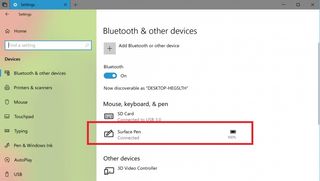
In more optimistic news, it looks like Windows 10 will be getting a long sought-after feature in the form of battery level icons for Bluetooth devices. Windows Report spotted the change in Windows 10 build 17639 – a version released to Windows Insiders who opted into the Skip Ahead program.Skip Ahead grants access to early, experimental, versions of Windows 10, allowing users to try out future features that may (or may not, if they don’t work properly) end up in Windows 10.In Windows 10 build 17639, you can now easily see the battery level of paired Bluetooth devices in the ‘Bluetooth & Other Devices’ settings window.This makes using Bluetooth devices much easier, as you can see which ones need to recharge their batteries with just a glance. It’s a feature present in many other operating systems, so we’re pleased to see it finally coming to Windows 10.Credit: TechradarDiscover more from NewsBreakers
Subscribe to get the latest posts sent to your email.
What's your reaction?
Excited
0
Happy
0
In Love
0
Not Sure
0
Silly
0


